
Everything you need, in one place.
The answers families and coaches ask for most — what happens after you register, what to bring, how paying works, and who to call when something changes at the last minute.
After you register
Registration takes a few minutes. Here is what happens next, in order.
- 01Sign the waiver and photo release
Both are part of registration and both are per child. The photo release is opt-in — say no and your child stays out of every photo the club publishes, with no effect on their place.
- 02A club director places the player
For travel teams and anything needing a tryout, a club director confirms the group. For classes and camps, your place is held as soon as you register.
- 03Your schedule appears in the portal
Sign in and every session your child is on shows up with its day, time and field — kept current, so a field change reaches you without a group chat.
- 04Billing starts before the first session
Payment needs to be made before the player joins the program. For any questions about this, email us.
Put Stage10 on your phone
It takes a minute. The app gets its own icon, opens full screen, stays signed in, and sends you the club's notifications — a cancelled session reaches you before you leave the house.
On an iPhone
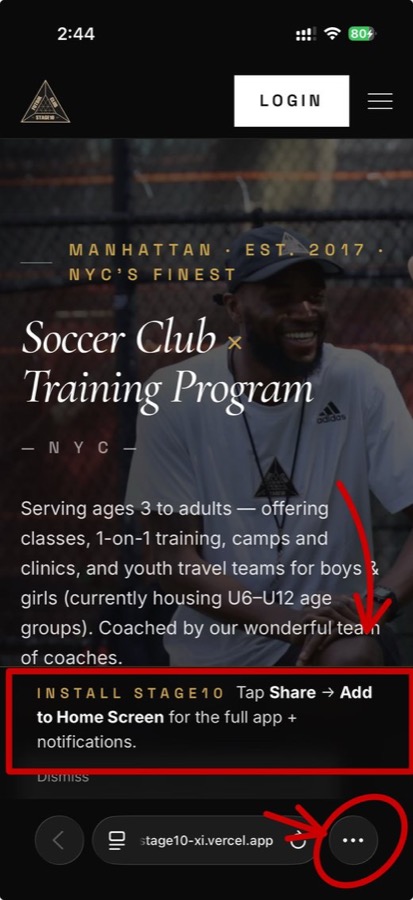
1. Open stage10fc.com in Safari and tap the ••• button.
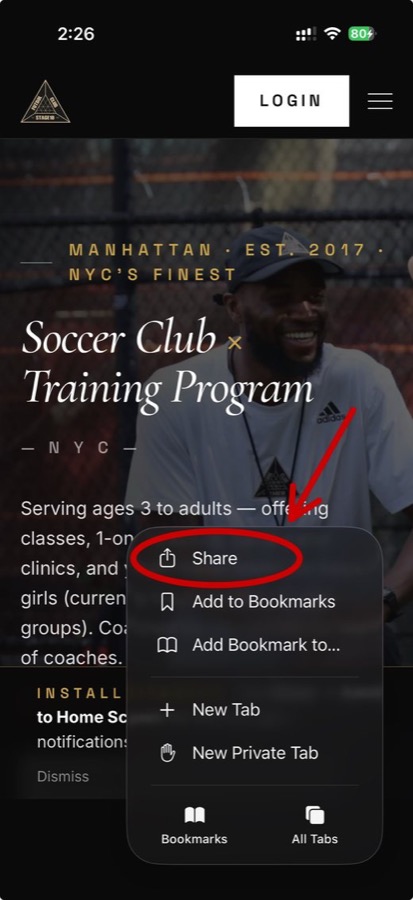
2. Tap Share.
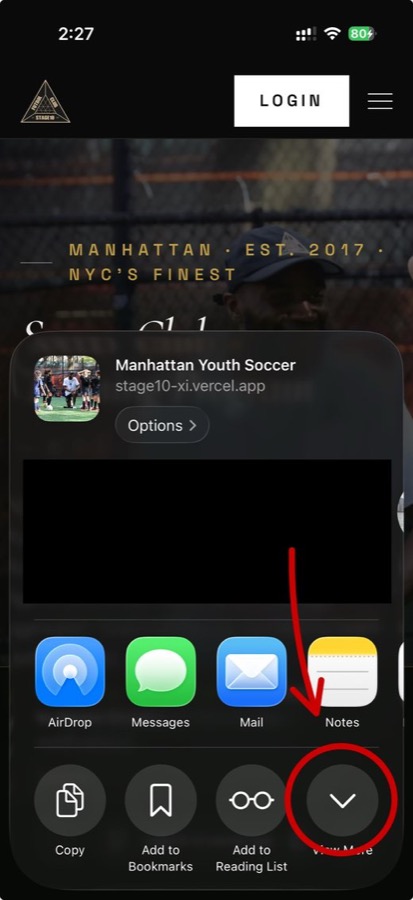
3. Tap the ∨ circle to see the rest of the list.
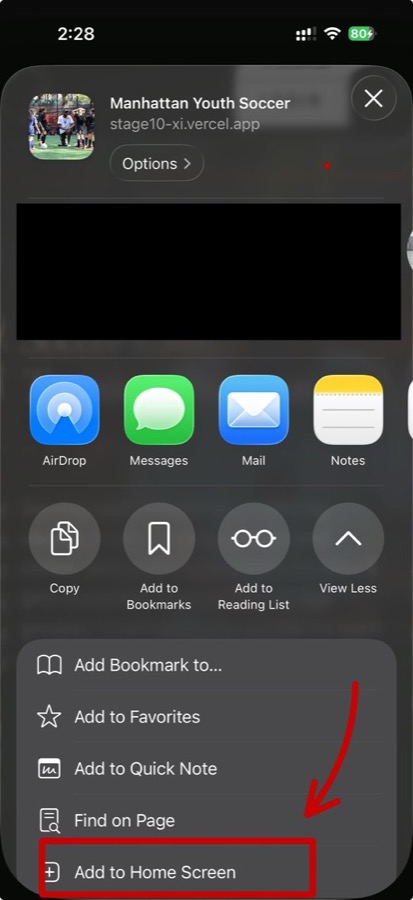
4. Scroll down and tap Add to Home Screen.
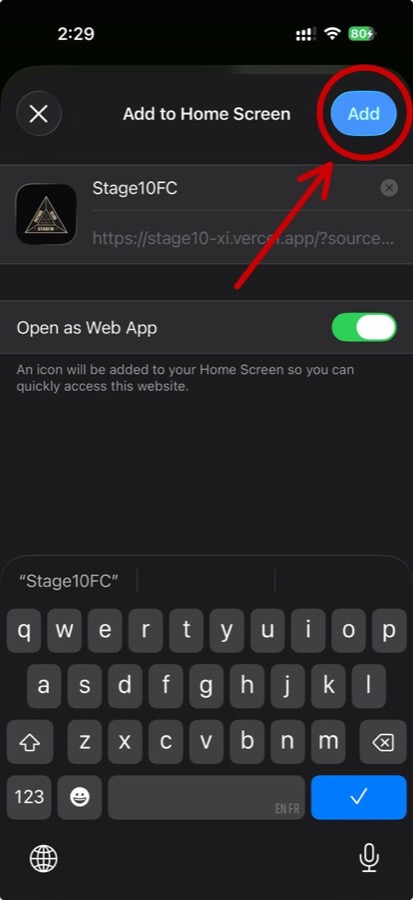
5. Leave Open as Web App on, then tap Add.
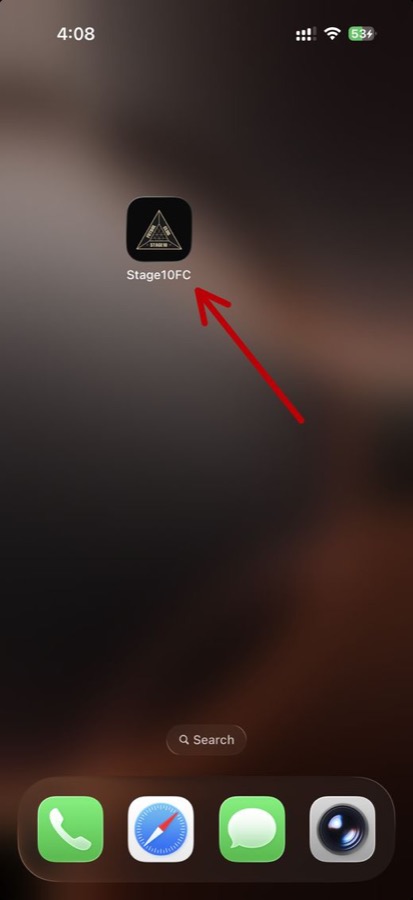
6. The Stage10 icon is now on your home screen.
On an Android phone
Open stage10fc.com in Chrome. It offers Install app at the bottom — tap it, then Install. If it doesn't offer, use the ⋮ menu → Add to Home screen.
Then turn notifications on
Open the app, sign in, tap the bell at the top, and tap Turn on push notifications. When your phone asks, tap Allow.
What to bring
Shin guards are required for every session. Players must pack soccer cleats and turfs to every session and game.
A full bottle. Some of our fields and locations don't have a water fountain nearby.
For games, always bring both the white and the black jersey. For practice, wear any Stage10 attire — practice shirts, hoodies, jackets.
Always bring a ball. U7 and below: size 3. U8–U12: size 4. U13 and up: size 5.
Rain jackets, gloves, hats, garbage bags and winter jackets should be packed when necessary.
Whoever drops off should be reachable by phone until pickup, especially for the younger groups.
Sessions run in all but genuinely dangerous weather. If a session is cancelled or moved, every family on that program gets a notification — check your phone before you travel.
Paying, and what to do if you can't
Card and bank transfer run through the club portal — open Billing and pay the balance there. Venmo, Zelle and cash are all still accepted. Please make sure to put full details of the payment in the note section. Always put your child's full name and the training date or service you are paying for.
- Zelle
- Stage10 FC Academy Inc. · 845-820-2422
- Venmo
- @Stage10fc (the profile picture is the Stage10 FC logo)
- Check
- Payable to Stage10 FC Academy Inc. Hand it over in person — checks can't be mailed.
- Cash
- In a sealed envelope, given directly to the coach. Please don't mail cash.
No child is turned away over cost. That is the policy, not a gesture. Scholarships and payment plans are simple and case-by-case — email info@stage10fc.com or clubmanager@stage10fc.com.
Email the clubFull prices for every program are on the pricing page.
Running your sessions
Take attendance on the field even with no bars. It saves on your phone and uploads itself the moment you are back on data — don't wait, and don't do it twice.
Attendance is what generates family billing and your own pay. A session left unmarked is a session nobody is charged for and you are not paid for.
Tell Eric or the club manager rather than the parents directly. Cancelling it in the system notifies every family at once and takes it off billing in the same move.
Pay follows the sessions you are marked on, at the rate agreed for that program. Ask Eric if a session or a rate looks wrong — it is fixable.
- All team schedules
- How to take attendance
- Videos for technical sessions and warm-ups
- Inputting scores
- Coach info sheet
- Team spreadsheets
- Communication guide
- Game schedule links
- Tournaments
- Videos from coaches and players
- Equipment
- Travel team info sheet
Ask a person
If something here doesn't answer your question, email the club and someone will get back to you.
clubmanager@stage10fc.com